
Export open house leads in under a minute, in the format your workflow actually uses. That is the entire job of OpenHouse's export screen. The app captures and qualifies visitors at the door, and the moment the event ends, everything it learned is yours. CSV for a spreadsheet, PDF for a printout or a seller, vCard for Apple Contacts, a pre-addressed email, plain text on the clipboard, or a straight share-sheet handoff into your CRM's app. No account, no sync queue, no "your data is being processed" spinner. You tap, you pick a format, the leads leave.
That sounds like table stakes. It is not. Plenty of sign-in apps treat your visitor list as their asset, gated behind a dashboard login or quietly shared with a lender partner. OpenHouse goes the other way. Leads live on your device, and export is the main event. The rest of this page covers each format with a real use case, then walks a CSV into Follow Up Boss. It ends with the guarantee that matters most: you can still export open house leads after you stop paying.
Why one-tap export beats a brittle CRM sync
The standard pitch in this category is the automatic sync: connect your account once and your open house leads flow into your CRM on their own. For a brokerage with an ops team, fine. For a solo agent, automatic syncs are where leads go to die quietly:
- Syncs fail silently. An expired OAuth token, a renamed pipeline, an API change on either end, and your Saturday sign-ins never arrive. You find out three weeks later, when the buyer has already closed with someone else.
- Syncs need accounts and servers. A background sync means your visitor data travels through someone's backend. That is one more place it can leak, be mined, or be held hostage.
- Syncs lock you in. Once the plumbing is connected, switching CRMs (or switching sign-in apps) means untangling it. Open formats never have that problem.
A deliberate, visible export flips all of that. When you export open house leads yourself, you see the file. You know what left the device, when, and where it went. If your CRM import chokes, you find out in ten seconds instead of three weeks. CSV and vCard have worked for decades and will still work with whatever CRM you run in 2030.
For a solo agent who runs two to four open houses a month, sixty seconds of tapping beats a fragile pipe every time.
OpenHouse is not a CRM and does not want to be one. It captures and qualifies visitors, then hands them to you. That narrow scope is on purpose, and it matches everything else OpenHouse does.
Every way to export open house leads, and when to use each
Six formats, six different Mondays. Here is when each one earns its keep.
| Format | Best for | Connection needed? |
|---|---|---|
| CSV | CRM import, spreadsheets, mail-merge lists | No |
| Printing, compliance records, sharing with a seller | No | |
| vCard / Contacts | Calling and texting from your iPhone today | No |
| Sending the lead list to yourself or an assistant | Yes (to send) | |
| Clipboard | Pasting emails into a BCC line or a text thread | No |
| Share sheet | Direct handoff to a CRM app, AirDrop, Messages, Drive | Depends on target |
CSV: the universal spreadsheet
CSV is the workhorse. Every lead from the event lands in one clean spreadsheet file: name, phone, email, representation status, timeframe, notes, sign-in time. Open it in Numbers or Excel and sort the hot leads to the top, or feed it to any CRM's import tool. Some agents keep a master spreadsheet of every open house they have ever run, and it works. Export open house leads to CSV after each event and that spreadsheet is the whole system. There is a reason roundups like The Close's open house app guide keep hammering on lead handoff. An app that captures fifty names and exports zero of them cleanly captured nothing.
PDF: the human-readable record
Export open house leads to PDF when the reader is a person rather than a database. You get a formatted sign-in record: a compliance file for your broker, a printed backup for your transaction folder, an attachment for the listing agent when you sat someone else's open house. Sellers also read a PDF at a glance, though if the goal is impressing the seller, you can turn the same data into a seller report instead of sending a bare visitor list.
vCard and Apple Contacts: call them tonight
The fastest follow-up channel a solo agent has is the phone already in their pocket. The vCard export turns each lead into a standard contact card you can add straight into Apple Contacts, which means caller ID, iMessage, and FaceTime know who "Dana from the Maple St open house" is before you have left the driveway.
vCard export for real estate leads is criminally underrated. Export open house leads into Contacts within an hour of the event and your first text lands while the showing is still fresh in the buyer's mind. NAR's research on buyer and seller behavior has documented for years how heavily buyers lean on the first agent who responds. Speed is the cheapest advantage there is.
Email: send the list anywhere
The email export drops your lead list into a pre-composed message. Send it to yourself for archiving, or to your CRM's email-to-lead inbox if it has one (Follow Up Boss can ingest forwarded leads). It is also the simplest way to export open house leads to an assistant who handles your data entry.
Clipboard: the duct tape option
Sometimes you just need the email addresses. The clipboard export copies leads as plain text so you can paste them into a BCC line for a "thanks for coming" blast, into a group text, or into any field in any app that accepts text. No format negotiation, no import wizard. Duct tape, in the best sense.
Share sheet: straight into your CRM's app
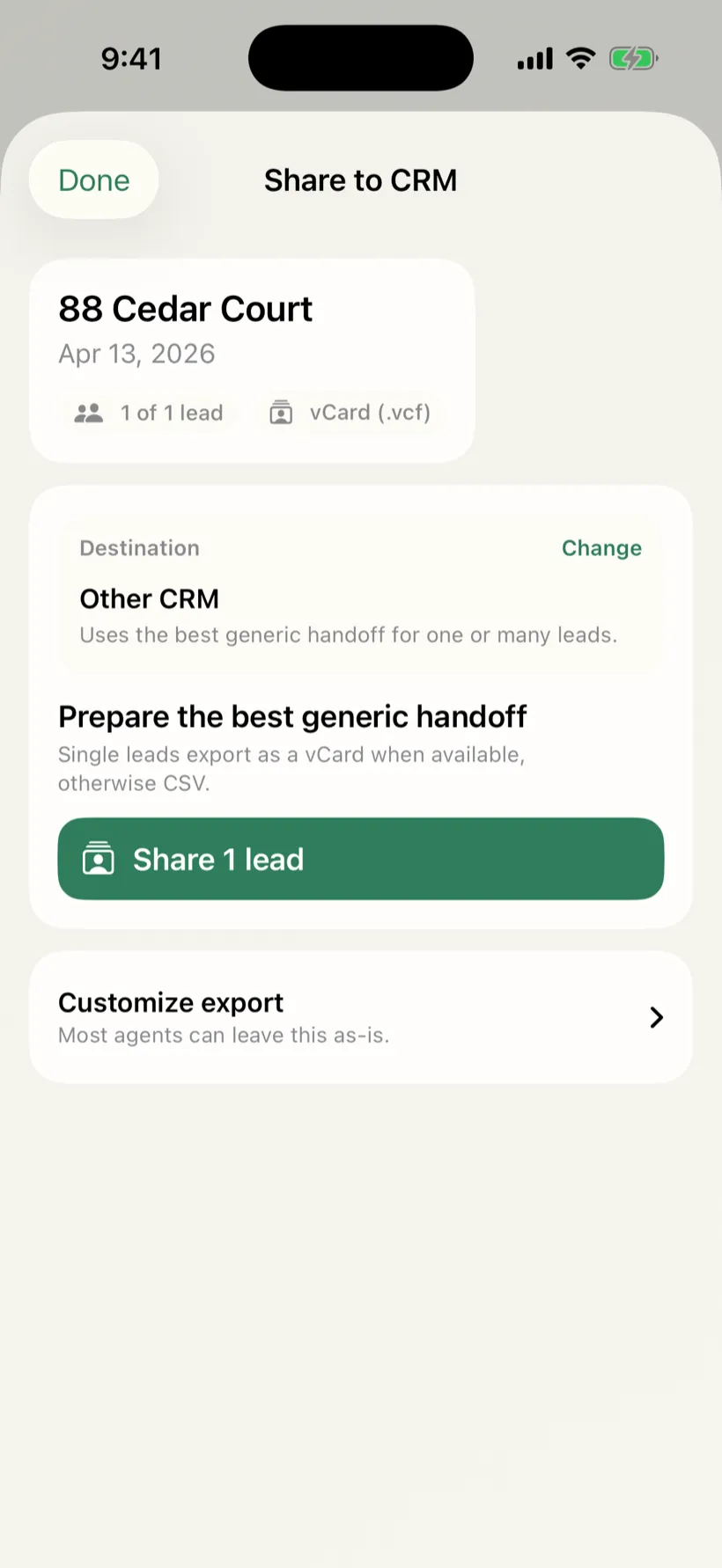
The iOS share sheet is the most direct route from sign-in app to CRM. Export open house leads to the CRM app installed on your phone and its own import flow takes over from there. The same sheet reaches AirDrop (hand leads to a co-listing agent standing next to you), Messages, Mail, Files, Drive, and Dropbox. One export surface, every destination iOS knows about.
CRM handoff walkthrough: CSV into Follow Up Boss
Here is how to export open house leads into Follow Up Boss, from closed front door to pipeline. The same shape works for LionDesk, Wise Agent, or anything else with a CSV import. If your pipeline lives in a bigger platform, the same export drops cleanly into BoldTrail or kvCORE too.
- End the event in OpenHouse. Your leads are already qualified from sign-in (hot unrepresented buyers, represented visitors, neighbors), so there is no triage step.
- Tap Export → CSV. The file is generated on-device, instantly. No upload, no processing queue.
- Get the file to your CRM. Share the CSV to Files or email it to yourself, then open your CRM's import tool (in Follow Up Boss: Admin → Import). Or share straight to the CRM's iOS app if it accepts files.
- Map the columns once. Name, email, phone, and notes map in seconds, and most CRMs remember the mapping for next time.
- Tag the import. Tag every row with the property address ("OH-142-Maple-St") so your automations and your memory both know where these people came from.
- Start following up. The leads hit your pipeline within minutes of locking the door. Grab follow-up templates to send after you export and put the speed to use.
Total time, with practice: about two minutes. That is the brittle-sync trade-off in concrete terms. Two minutes you watch happen, versus a background process you have to trust.
Getting open house leads into the CRM you actually use
OpenHouse is export-first, not integration-first. There is no live two-way sync, no OAuth handshake, no connector to maintain. What you get is a clean CSV (or vCard, or share-sheet handoff) that drops into any CRM that has ever been invented, because CSV has been the universal handoff format for thirty years and nothing has replaced it. Here is how that plays out in the eight platforms agents ask about most.
Export open house leads to Follow Up Boss
Follow Up Boss is the CRM of choice for a lot of high-volume solo agents and small teams, and its CSV import is straightforward. After the event, tap Export → CSV in OpenHouse. In Follow Up Boss, head to Admin → Import Contacts, upload the file, and map the columns, name, email, phone, and notes translate cleanly. Tag the import with the property address so your smart lists and action plans know the source. Some agents also use Follow Up Boss's email-to-lead inbox: OpenHouse's email export sends your lead list as a formatted email, and Follow Up Boss can ingest that as individual contacts if you forward it to your FUB inbox address. Either path gets your leads in within a few minutes of locking the door.
Export open house leads to kvCORE or BoldTrail
kvCORE and its rebranded successor BoldTrail both accept standard contact CSV imports through their lead management tools. The column structure OpenHouse exports, name, email, phone, representation status, timeframe, notes, maps to the standard fields both platforms expect. Import, set the lead source to the property address, and assign to a drip if your brokerage has one set up. You can also compare how OpenHouse pairs with BoldTrail if you want a deeper look at how the two tools sit in the same workflow without duplicating each other.
Export open house leads to Salesforce
Salesforce's Data Import Wizard accepts CSV files and maps them to Lead or Contact records. Export from OpenHouse, open the Import Wizard (Setup → Data → Data Import Wizard), choose Leads, upload the file, and map the fields. If your brokerage has a custom Salesforce org with real estate fields, the notes column from OpenHouse (buyer timeline, representation status) can map to whatever custom field your admin set up. For individual agents on a standard Salesforce org, the out-of-the-box Lead fields cover everything OpenHouse captures.
Export open house leads to HubSpot
HubSpot's Contacts import accepts CSV with a header row. Export from OpenHouse, go to Contacts → Import in HubSpot, upload the file, and map name, email, and phone. HubSpot will flag duplicates automatically if a visitor is already in your CRM. Add the property address as a note or a custom property on import, and your open house contacts land in whatever pipeline stage you have set for new leads.
Export open house leads to Google Sheets
Google Sheets is not a CRM, but it is a perfectly functional lead log for agents who are not ready to pay for one. Export a CSV from OpenHouse, open the Sheets app on your iPhone and import the file, or share it directly to Sheets via the iOS share sheet. From there you can sort by timeframe, color-code hot leads, or use a mail-merge add-on to send a follow-up email to the full list. A lot of agents keep a master Sheets tab, one row per open house visitor, one tab per property, as a lightweight alternative to a full CRM. OpenHouse's CSV columns slot straight in.
Export open house leads to Mailchimp
Mailchimp's audience import accepts a CSV with at minimum an email column and an optional first/last name column. Export from OpenHouse, go to Audience → Import Contacts in Mailchimp, upload, and assign a tag for the property or event date. Your open house visitors are now in a Mailchimp audience and ready for a follow-up sequence, a "thanks for coming" email, a market update, or a listing announcement when something relevant hits the market.
Export open house leads to LionDesk
LionDesk has a CSV import under the Contacts section. The fields OpenHouse exports, name, email, phone, notes, match LionDesk's standard contact model. After import, you can assign a drip campaign directly from the import screen. LionDesk also supports texting from inside the CRM, which pairs well with the speed-of-follow-up argument: export open house leads to LionDesk within an hour of the event, trigger a text drip, and your first touchpoint lands the same afternoon.
Export open house leads to Sierra Interactive
Sierra Interactive's CRM accepts lead imports via CSV through the admin panel. The process follows the same shape as the others: export from OpenHouse, import in Sierra, map columns, set the lead source. Sierra's routing rules can also assign the imported leads to a follow-up plan automatically on import, which means the manual step is just the upload, the drip starts itself.
Does Follow Up Boss have an open house app?
This comes up often enough to address directly: Follow Up Boss does not have a dedicated open house sign-in app. FUB is a CRM, it is built for pipeline management, action plans, and team routing, not for collecting names at a front door. There is no kiosk mode, no single-screen sign-in form built for a visitor to fill out, and no offline capture flow designed for a tablet propped up on a granite countertop.
That gap is exactly what OpenHouse is built for. The two tools are not competitors, they sit in sequence. OpenHouse handles the open house itself: single-screen sign-in, visitor qualification (represented or not, timeframe, notes), offline capture so a dead Wi-Fi connection does not cost you a lead. When the event is over, you export open house leads to Follow Up Boss via CSV and FUB's pipeline machinery takes over from there.
If you are already a Follow Up Boss user, the workflow is: run OpenHouse at the door, export CSV at the end of the event, import into FUB in two minutes, let FUB's action plans handle the follow-up. You get purpose-built capture at the front end and purpose-built pipeline management at the back end, without asking either tool to do something it was not designed for.
The read-only guarantee: your leads outlive your subscription
The quiet fear behind every "should I trust this app with my leads?" question is lock-in, and it is a rational fear. When Spacio wound down, agents who had years of open house history in it faced a deadline to get their data out before the app disappeared from the App Store in January 2026. Lock-in is not always about shutdowns, either. Curb Hero is free and genuinely popular, but its own help center explains how lenders are paired with your listings and how visitor info is shared when buyers opt into mortgage questions. The business model runs through your sign-in data.
OpenHouse answers this with architecture instead of a promise buried in the terms. Leads are stored locally on your device and never touch a server unless you export them, so there is no cloud account to get locked out of in the first place. If your subscription lapses, the app drops into a data-safe read-only mode. You cannot run new events, but you can still view and export open house leads in every format, indefinitely. Your leads stay exportable even if you cancel. That is the deal, in writing, because an export feature you can lose was never really an export feature.
If you capture a lead at your open house, that lead is yours, on day one of the trial and on the day after you stop paying. Try it during the trial and see how fast you can export open house leads. The export screen is the feature everything else is built around.
Frequently asked questions
What formats can I export open house leads in?
OpenHouse exports leads as a CSV spreadsheet, a formatted PDF, vCard files for Apple Contacts, a pre-addressed email, plain text on the clipboard, or anything the iOS share sheet can reach. Every format is one tap from the event screen.
Can I get open house leads into my CRM, like Follow Up Boss?
Yes. Export a CSV and import it through your CRM's standard import tool, or share leads directly to your CRM's iOS app via the share sheet. OpenHouse uses open formats rather than a proprietary sync, so it works with any CRM that accepts CSV or contacts.
Do I lose my leads if I cancel my OpenHouse subscription?
No. If your subscription lapses, OpenHouse switches to a data-safe read-only mode. You can no longer run new events, but every lead you captured remains viewable and exportable in every format, forever.
Does exporting open house leads require an internet connection?
Generating the export does not, CSV, PDF, vCard, and clipboard exports are built entirely on your device. You only need a connection for the final step if you are emailing leads or sharing them to an online CRM.
Does OpenHouse sync automatically to a CRM in the background?
No, and that is deliberate. Background syncs require accounts, tokens, and a server between you and your data, and they fail silently. OpenHouse keeps leads on your device and hands them off only when you explicitly export.
Does Follow Up Boss have an open house app?
Follow Up Boss does not have a dedicated open house sign-in app. It is a full-featured CRM built for lead follow-up and pipeline management, not door-duty capture. OpenHouse fills that gap, run sign-in on your iPad, export the CSV, and import it into Follow Up Boss in a couple of minutes. The two tools sit in sequence, not in competition.
How do I get open house leads into kvCORE or BoldTrail?
Export a CSV from OpenHouse after the event, then use kvCORE's or BoldTrail's CSV import tool to bring the leads in. Both platforms accept standard contact CSV files. Map name, email, and phone, tag the source as the property address, and your leads land in your pipeline. See the OpenHouse vs BoldTrail comparison for more on how the tools pair together.
Can I export open house leads to Google Sheets?
Yes. Export a CSV from OpenHouse and open it directly in Google Sheets, or share the file to the Sheets app via the iOS share sheet. From there you can sort, filter, or build a mail-merge list. A lot of agents use Sheets as a master open-house log with one row per visitor and one tab per property.
Can I import open house leads into Mailchimp?
Yes. Mailchimp's audience import accepts a CSV with name and email columns. Export from OpenHouse, import into your Mailchimp audience, tag the source with the property address or event date, and your open house visitors are ready for a follow-up email sequence.