
An open house team workspace is one shared account where every agent on your roster runs their own listings, and every lead they capture lands in a single dashboard the whole team can see. You invite the agents, each one works their own door on their own iPad or iPhone, and the names, phone numbers, and qualifiers they collect all flow back to one place a team lead can open in any browser. Billing is per seat, so the cost tracks the size of the roster and nothing else. The leads stay the team's leads: they capture offline at the door, they deliver to the team's CRM, and they are never sold.
This page is about the workspace mechanic itself: how the shared account is wired, how each lead stays attributed to the agent who captured it, and how the seats are billed. If you want the case for your specific role, the real estate teams, team leader, and brokerage pages make that argument. This one explains the machine underneath them.
The iPad runs the door, the web app runs everything around it
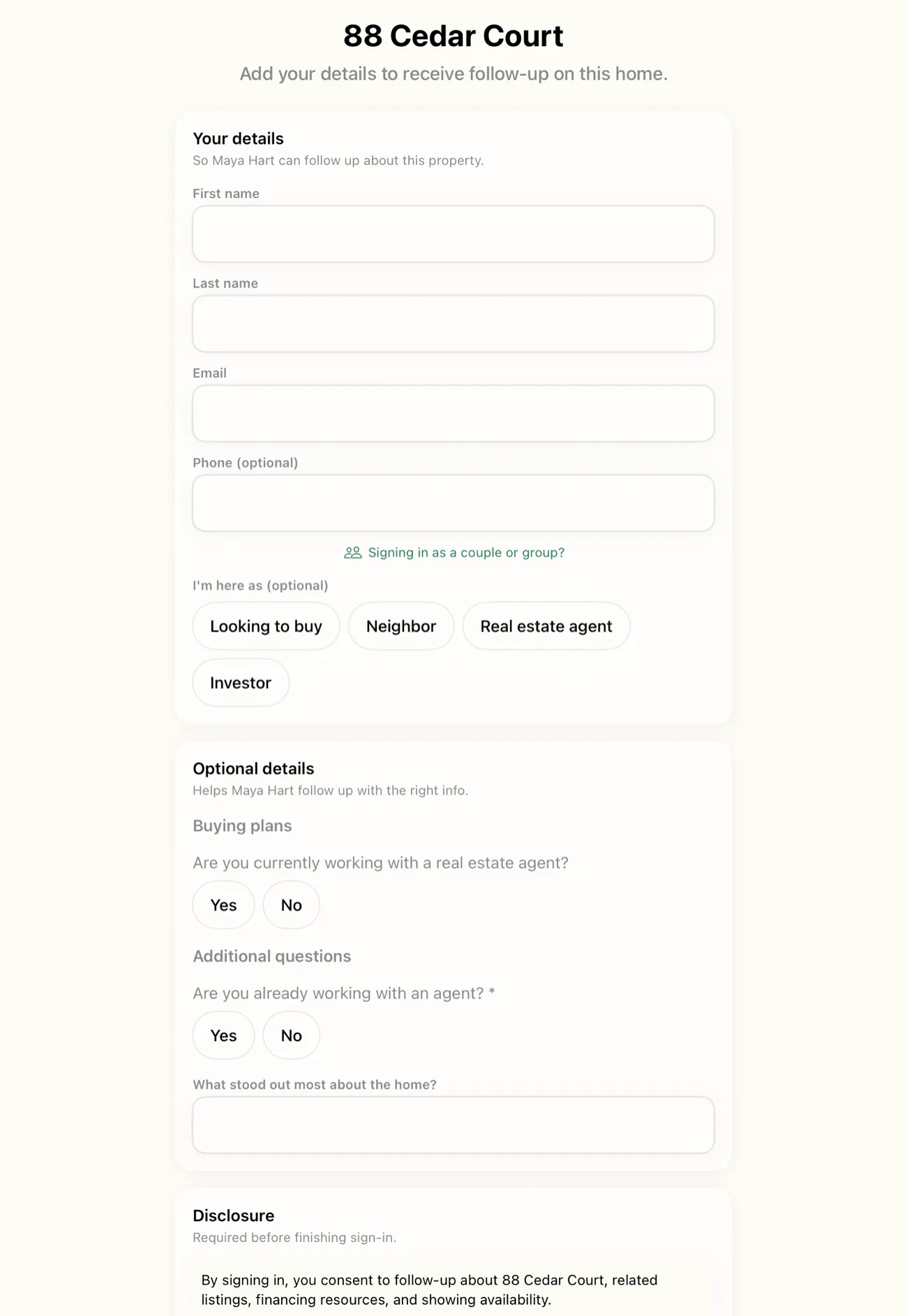
A team does not need a shared device or a shared listing to share a workspace. Each agent keeps their own phone and their own iPad, and each one runs the single-screen sign-in at their own open house. That part looks exactly like the solo experience: a visitor picks up the iPad, fills in name, email, and phone, and is in the house in about ten seconds. Nothing about the door changes because the agent is on a team.
What the team adds is the layer around the door. When cloud sync is switched on, every agent's captured leads roll up into one dashboard in the web app at app.openhousekiosk.com. A team lead opens a browser, sees every event across the roster, and reads who signed in where, without walking over to anyone's iPad or asking for a CSV. The tablets handle the front door. The web app handles the coordination.
That split matters because it keeps the reliable part reliable. Capture is still on-device and offline first, so a listing in a basement with no signal works the same for a team as it does for a solo agent. The shared dashboard is the payoff you get once the device is back online, not a dependency the door leans on during the event.
One dashboard the whole team can see
The heart of the workspace is a single view of every lead the team captured. Instead of five agents each sitting on their own list, phone photos of a paper sheet, a CSV in one inbox, a half-finished spreadsheet in another, the team gets one place where all of it lands. A team lead can see the volume from Saturday across four listings in one screen, and each agent can see their own leads inside the same shared account.
Be clear about what this dashboard is and is not. It is visibility: every agent's leads and events, gathered in one place, each one tagged with the property and the agent who ran it. It is not a ranked board, a score, or a contest. OpenHouse does not rank your agents against each other, it does not score leads, and it does not auto-prioritize anyone. There is no leaderboard, because a shared dashboard exists to give a team lead an accurate picture, not to turn a Saturday into a scoreboard. The follow-up tools never auto-rank a lead either. The agent decides who to call first, and the team lead decides what the numbers mean.
That restraint is deliberate. A dashboard that pretends to know which lead is hot, or which agent is winning, is guessing, and a wrong guess in front of a team causes more damage than a plain, honest list. So the workspace shows the real thing: who signed in, at which address, under which agent, and what they said at the door. Judgment stays with the people.
Event scoping: every event is tied to one address
The question every team lead asks first is the obvious one: if everyone captures into one account, how do the leads not turn into a pile? The answer is event scoping, and it is the quiet mechanic that makes the whole workspace hold together.
Every open house in OpenHouse is an event, and every event is tied to one property address. A visitor who signs in is attached to the event they signed in at, which means they are attached to that address and to the agent running that door. Two agents running two different listings on the same Saturday afternoon are running two separate events, so they build two clean lists. A lead captured at 412 Maple never lands in the 88 Oak agent's list, because the two are different events scoped to different addresses. Leads do not bleed between agents.
When those events roll up into the shared dashboard, the scoping travels with them. Each lead still carries its event and its address, so the team lead reads the aggregate without losing the detail: this batch came from Dana's listing on Maple, that batch came from Priya's listing on Oak. The shared view is a sum of clean parts, not a blur. If your team runs several open houses across a single weekend, the running multiple open houses guide covers the per-event logistics that keep each list separate, and event scoping is what carries that separation into the team dashboard.
This is also what makes attribution honest after the fact. When a lead becomes a client three weeks later, the record already says which agent captured them and at which listing. No one has to reconstruct it from memory or argue about a name on a shared spreadsheet.
Per-seat billing that scales with the roster
Team pricing is deliberately boring, because a team should be able to predict the bill without a sales call. Each seat is 9.99 dollars a month, or 79.99 dollars a year, the same price a solo agent pays, with a one-month free trial. The cost is the seat count times the price. That is the whole formula.
Because it is per seat, the bill tracks your actual roster:
- A new agent joins. Add a seat. They get their own door flow and their own leads inside the shared workspace.
- An agent leaves. Drop the seat. You stop paying for it.
- A seasonal or part-time roster. You are never paying for headcount you do not have, and there is no minimum team size to qualify.
There is no separate enterprise tier gated behind a demo, and no per-lead metering that punishes a good weekend. A ten-agent team is ten seats. A three-agent team is three seats.
The read-only boundary from the solo app carries over honestly. If billing lapses on a seat, that seat drops to a data-safe read-only mode: no new events, but every lead already captured stays viewable and exportable for free. And because the team's leads live in the shared dashboard, the leads captured under the team stay with the team even as individual seats come and go.
The leads still belong to the team
A shared workspace does not change who owns the data. It stays the team's, on the same terms a solo agent gets, and that is the part worth reading closely, because plenty of "free" open house tools in this category earn their keep by doing the opposite.
On-device first, never sold. Visitor data is captured on the agent's device before it is anywhere else, and it is never sold. There is no lender co-branding on the sign-in form, so a visitor is signing in to your team, not to a mortgage partner. That is a real point of difference. Curb Hero, for example, is free and popular, and its own help center explains how lenders are paired with your listings and how visitor info is shared when buyers opt into mortgage questions. The business model runs through the sign-in data. OpenHouse's does not. For the full picture of who can see what, see private lead capture.
Offline at the door. Every agent's offline capture works with no Wi-Fi, so a dead zone at one agent's listing does not cost the team a lead. The sign-in saves locally the instant a visitor taps done, then syncs to the shared dashboard once the device is back on a connection.
Delivered to the team's CRM. Team leads reach the team's pipeline the same way solo leads do. OpenHouse delivers natively to Follow Up Boss, HubSpot, BoldTrail (kvCORE), Lofty, and Sierra Interactive, and exports as CSV, vCard, or Apple Contacts for anything else. The lead export and CRM handoff works per agent and across the whole workspace, so leads are never trapped inside OpenHouse.
Cloud sync is what powers all of this for a team, and it is opt-in by design. Switching it on is how separate devices feed one dashboard and how leads flow to the CRM. Left off, each device stays fully offline and on its own, which is the right default for a solo agent but not much use to a team that wants a single view. Turning it on is the deliberate choice a team makes to trade some of that isolation for a shared picture, and the door flow itself does not change when you do.
Where the team workspace stops
It is worth being plain about the edges, because a team evaluating this should know exactly what it is buying. OpenHouse is not a CRM, and the team workspace does not turn it into one. There are no drip campaigns, no pipeline stages, and no dialer inside the shared dashboard. It gathers what your agents capture at their doors and hands it to the CRM your team already runs, then gets out of the way. That narrow scope is the point.
The workspace also does not add a leaderboard, lead scoring, or automated lead verification, because none of those are built, and a team page is exactly the wrong place to imply a feature exists. What the workspace does is real and specific: it puts every agent's listings and leads into one shared account, keeps each lead attributed to the right agent by event, delivers to the team's CRM, and bills per seat. That is the machine.
For the argument tailored to how you actually run, the persona pages go deeper than this one does. If you lead a team, team leaders covers coordination and coaching. If you run a shop, brokerages covers the multi-agent picture. And real estate teams covers the day-to-day of a group working listings together. This page is the feature; those pages are the fit. Speed of follow-up is the throughline across all of them, and NAR's research on buyer behavior points at the same thing every team lead already knows from door duty: the agent who reaches a serious buyer first tends to keep them. A shared workspace exists to make that first touch happen faster across the whole roster, not to add a dashboard for its own sake.
If your team has been stitching Saturday together from five separate lists, run one weekend on a shared workspace and watch every lead land in one place, attributed, exportable, and already on its way to your CRM.
Frequently asked questions
What is an open house team workspace?
It is one shared account where every agent on your roster runs their own listings, and every lead they capture lands in a single dashboard the whole team can see. Each agent works their own door on their own device, and the leads roll up into one place a team lead can open in any browser.
How do leads stay attached to the right agent in a shared workspace?
By event. Every open house event is tied to one property address, and a visitor who signs in at that event is attached to that event and the agent running it. So two agents running two listings on the same Saturday keep two clean lists, and each lead carries its address into the shared dashboard.
How does team billing work?
Per seat. Each seat is 9.99 dollars a month or 79.99 dollars a year, with a one-month free trial, and the cost tracks the size of your roster. Add a seat when an agent joins, drop one when an agent leaves. There is no separate enterprise tier and no minimum headcount.
Do team leads still deliver to our CRM?
Yes. Leads from the shared workspace deliver natively to Follow Up Boss, HubSpot, BoldTrail (kvCORE), Lofty, and Sierra Interactive, and export as CSV, vCard, or Apple Contacts. The team's leads reach the team's CRM the same way a solo agent's leads do.
Does capture still work offline at the door with a team?
Yes. Each sign-in saves on the agent's device the moment a visitor taps done, with no network call during the event. The shared dashboard runs on cloud sync, which is opt-in, so leads captured offline sync up to the team dashboard once the device is back online.
Does OpenHouse rank agents on a leaderboard?
No. The shared dashboard shows every agent's leads and events in one place, but it does not rank agents against each other, score leads, or auto-prioritize anyone. It is visibility, not a scoreboard. The team decides what the numbers mean.
Can each agent run separate listings under one workspace?
Yes. Every agent creates and runs their own events for their own addresses. The workspace does not force a shared listing or a shared device. It gathers what each agent captures into one dashboard while keeping each event and each lead attributed to the agent who ran the door.
What happens to a team member's leads if their seat lapses?
That seat drops to the same data-safe read-only mode the solo app uses: no new events, but every lead already captured stays viewable and exportable for free. Because team leads live in the shared dashboard, the leads captured under the team stay with the team.