
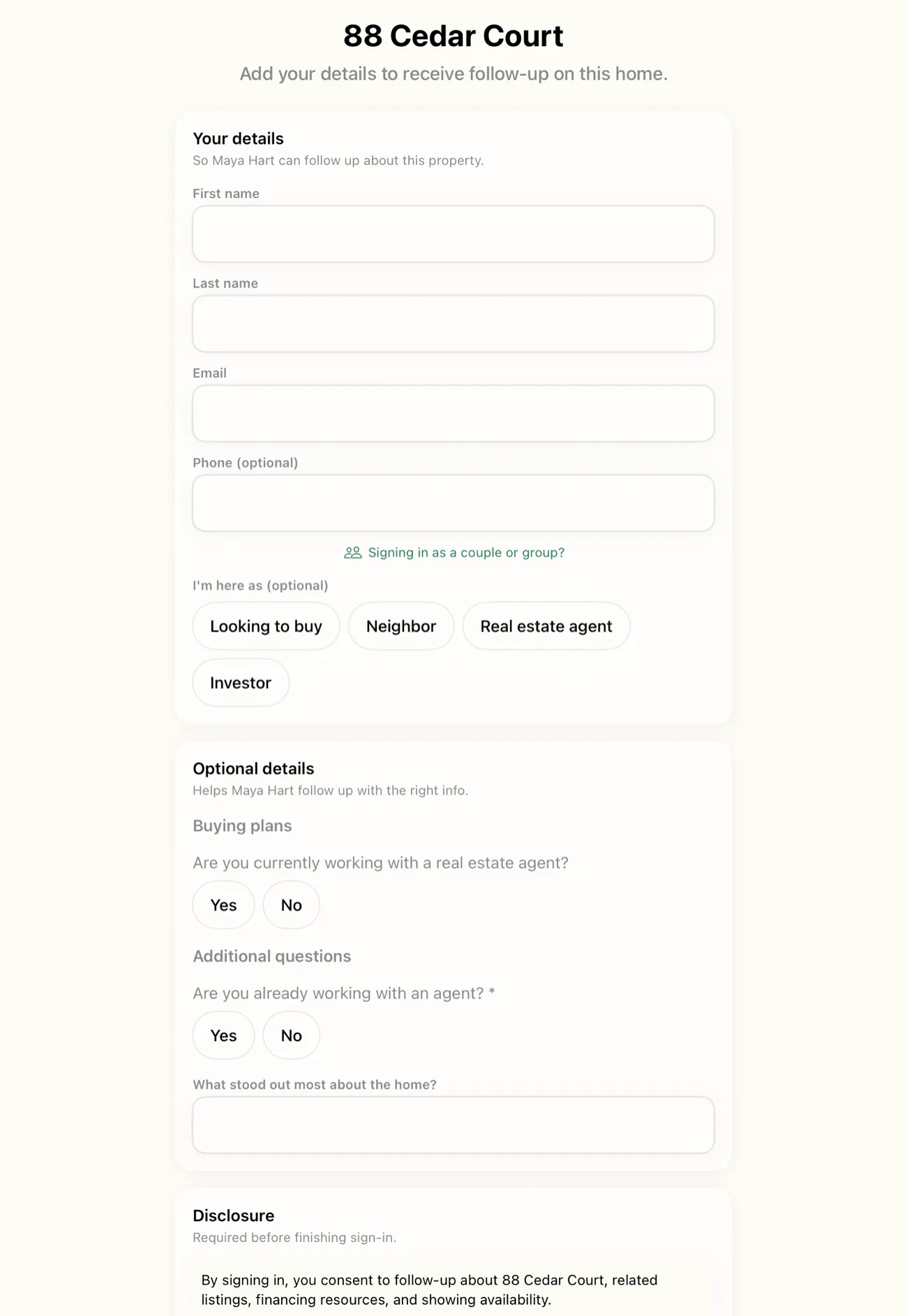
You do not install anything to run an open house with the OpenHouse web app. Open app.openhousekiosk.com in any browser, on a laptop at the kitchen counter or a desktop back at the office, and you can set up the event, watch sign-ins land live as visitors submit them, qualify your leads, and connect your CRM. No app store, no download, no update to wait on. The iPad by the front door still runs the sign-in itself. The web app runs everything around it.
That is the short version of the division of labor, and it is worth stating plainly before anything else: the native iPhone and iPad app is the door, and the open house web app is the control room. One captures visitors at the listing, offline, on the device. The other lets you set up, watch, qualify, and route those leads from any browser on any computer. They are not competitors and they are not two versions of the same thing. They are two halves of one workflow, and most agents will use both.
What the open house web app actually does
The web app is a full browser surface for managing your open houses, and it does four things that used to require the iPad in your hand:
- Set up events. Create a listing, set the address, price, and any custom sign-in questions, and generate the QR code before you leave the office. When you get to the property, the door is already configured.
- Watch sign-ins land live. As visitors submit the form, either on the kiosk iPad or on their own phones, the sign-ins appear in the browser in real time. You can be at your desk and see the room filling up.
- Qualify and prioritize. Read each lead, see representation status and timeframe, add notes, and decide who to call first, without touching the kiosk tablet.
- Connect a CRM. Paste an API key once and every sign-in flows to your pipeline on its own.
None of that needs an install. You log in to app.openhousekiosk.com the same way you log in to your bank or your email, and the whole dashboard is there. That matters more than it sounds, because the alternative most sign-in apps offer is a phone-sized screen and nothing else. Managing a busy Saturday of listings from a 6-inch display is a chore. Managing it from a browser tab next to your MLS and your calendar is not.
The division of labor: the iPad runs the door, the web app runs everything around it
Here is the mental model that keeps the two pieces straight.
The door is the native app. At the listing, an iPad (or an iPhone) on a stand runs the single-screen sign-in form, locked into kiosk mode. It captures every visitor on the device, with zero network calls during the event, so a dead-signal listing in the hills works exactly like a condo with fiber. That offline-first capture is the native app's job and only the native app's job, because a browser tab cannot promise to work with no Wi-Fi the way an installed app can. If you want the full story on why capture lives on the device, the offline lead capture page covers it.
Everything around the door is the web app. Setting up the event, generating the QR code, watching the sign-ins arrive, reading and qualifying leads, and connecting a CRM: all of that happens in the browser, and none of it needs to happen on the tablet that is busy running the door. You can do it before the event from the office, during the event from your phone or laptop, and after the event from your desk.
The practical payoff is that the tablet is never a bottleneck for your own work. The iPad is doing one thing, greeting visitors and saving sign-ins, while you do everything else from a real screen. A co-listing partner across town can be logged into the same dashboard watching the same sign-ins arrive. Nobody has to pass a device around.
Nothing to download, on either side of the sign-in
The "nothing to install" promise runs in both directions, and this is the part that changes how an open house feels.
For you, the agent, the web app is a browser tab. For your visitors, there is QR self-sign-in: a visitor scans a QR code with their phone camera, a sign-in page opens in their own browser, and they fill in the same single-screen form on their own device. Nothing to download for them either. No app store prompt, no "allow notifications," no account to create. They point the camera, tap the link, type their name, email, and phone, and they are done.
That solves two real problems at once. A busy weekend listing where twelve people arrive in fifteen minutes no longer bottlenecks at a single iPad, because half the room can sign in from their own phones while the kiosk handles the rest. And a visitor who is wary of picking up a stranger's tablet gets a private option: their phone, their keyboard, their thumbprint on the screen instead of yours.
Both the kiosk form and the QR form feed the same place. Whether a lead arrived on the iPad by the door or on a visitor's iPhone in the driveway, it lands in the same web dashboard, live, tagged to the same event.
Watching sign-ins land live
The single most useful thing the browser adds is presence. When a visitor taps done, on the kiosk or on their own phone, the sign-in shows up in your dashboard as it happens.
That means you do not have to be standing over the tablet to know how the open house is going. You can be in the primary suite walking a serious buyer through the closets, glance at your phone, and see that four more people have signed in at the door. You can be sitting a co-listing agent's open house across the city and watch your own listing fill up in another tab. After the event, the same live view becomes the record: everyone who came, in order, with their answers.
For a solo agent this is convenience. For a real estate team it is the whole point. Invite your agents into one shared workspace, each runs their own listings, and every lead from every door lands in one dashboard the whole team sees. The team lead does not chase five different phones for five different sign-in lists on Monday. The web app is the one place they all appear, live, as the weekend happens. Billing is per seat (9.99 dollars per month or 79.99 dollars per year each), and every seat gets the shared view.
Qualifying leads from the browser
A lead you can see is a lead you can act on. From the dashboard you read each visitor's answers, representation status, buying timeframe, and any notes, and you decide who needs a call first. OpenHouse does not rank or score them for you. There is no leaderboard and no AI deciding who your best lead is. You read the room and you make the call, because you were there and the algorithm was not. What the web app gives you is a clean, current view to make that call from.
The send itself stays personal, and it stays on your phone. The first touch goes out from you through Text Now and Email Now, which draft the opening message and hand it to the Messages or Mail app on your iPhone so it sends from your own number and your own address, not a shared marketing line. That first message is the one that matters most, and NAR's research on how buyers choose an agent has documented for years how heavily buyers lean toward whoever responds first. The browser dashboard's job is to make that decision quick: see who signed in, read what they said, and know who to call first from wherever you are, instead of waiting until you are back at a desk with the tablet in front of you.
Connecting a CRM from the dashboard
The web app is also where you wire OpenHouse into the rest of your stack. On the connections page you paste an API key once, and from then on every sign-in posts to your pipeline on its own after each event, tagged with the property address. OpenHouse delivers natively to Follow Up Boss, HubSpot, BoldTrail (kvCORE), Lofty, and Sierra Interactive, and for anything else there is a one-tap CSV, vCard, or Apple Contacts export. The lead export and CRM page covers every format and the read-only guarantee that keeps your leads exportable even if you cancel.
The important thing for the web app specifically is that this setup is a browser job, done once, sitting quietly in the background. You are not re-pasting keys on a phone before every event. You configure the connection in the dashboard, and the leads flow.
Where the web app needs a connection, and where it does not
Honesty about the boundary, because it is the difference between the two pieces. The web app is a browser experience, so it needs an internet connection to work, on your laptop and on a visitor's phone doing QR self-sign-in. The dashboard also shows your leads only when cloud sync is switched on.
Cloud sync is opt-in, not the default. By default, visitor data lives on the device at the door, and that is deliberate: your leads are yours, they are never sold, and there is no lender co-branding on the form (some free sign-in tools run their whole business on exactly that, pairing lenders with your listings in exchange for the app). When you switch cloud sync on, your leads become current on every device and in the web app, and flow to your CRM. When it is off, the on-device flow at the door is unchanged, and the browser dashboard simply will not show those events until you turn it on.
So the split is clean. If a listing has no signal, the kiosk iPad running the native app captures every visitor offline, no connection required. The web app and QR self-sign-in are for everything where you do have a connection, which is most of the time, at most listings, on most days. You get the offline safety net at the door and the browser control room everywhere else, and you choose when the two are linked.
It complements the native app, it does not replace it
If you take one thing from this page, take this: the web app is not a lighter version of the iPhone and iPad app, and the native app is not a stripped-down companion to the web app. Each does something the other cannot.
The native app is the only piece that runs fully offline on a device you control, locked into kiosk mode by a PIN and paired with Apple Guided Access so a curious visitor cannot tap out of the sign-in and into your email. That is the door, and it needs to be an installed app to make the offline and lockdown promises it makes. The kiosk mode page goes deeper on that setup.
The web app is the only piece that gives you a real screen, from any browser, on any computer, with nothing to install, shared across a whole team, watching sign-ins land live. That is the control room, and it needs to be a browser to reach every device you already own.
Run both and the workflow is whole: the iPad greets the room and captures offline, the QR code lets visitors use their own phones, and the browser dashboard lets you and your team set up, watch, qualify, and route every lead from wherever you happen to be standing.
What the web app is not
OpenHouse is not a CRM, and the web app does not pretend to be one. There are no drip campaigns, no pipeline stages, no dialer, and no automated lead scoring inside it. It captures and qualifies visitors and hands them to the tools you already use for the long follow-up. That narrow scope is on purpose. The web app is the best place in real estate to run the open house itself, and it is deliberately not trying to be the place you run the six months after. It connects to the CRM that does that job instead.
If you have been managing open houses from a phone-sized screen, or juggling a stack of tablets on Monday to figure out who came, open the web app at app.openhousekiosk.com and run your next listing from a browser. The iPad handles the door. You handle everything else, from anywhere.
Frequently asked questions
Do I have to download anything to use the OpenHouse web app?
No. The web app runs at app.openhousekiosk.com in any browser, on a laptop, desktop, or Chromebook, with nothing to install and no app store. Visitors can also sign in on their own phone by scanning a QR code, which is also nothing to download.
Does the web app replace the iPhone or iPad app?
No, it complements it. The native app runs the sign-in at the door and works fully offline. The web app runs everything around the door: event setup, live sign-ins, qualifying, and CRM connections. They are two halves of one workflow.
Can I run an open house entirely from a browser?
You can manage the whole event from a browser: set up the listing, watch sign-ins land live, qualify visitors, and connect a CRM. Visitors can sign in on their own phones by scanning a QR code. The one job that stays on the native app is offline capture on a kiosk iPad when a listing has no signal.
Do I need cloud sync turned on to use the web app?
Yes. Cloud sync is opt-in, and switching it on is what makes your leads current in the web app and on every device. With it off, the on-device flow at the door is unchanged, but the browser dashboard will not show those leads until sync is on.
Does the web app work on Windows, Android, or a Chromebook?
Yes. It runs in any modern browser on any computer, because there is nothing to install. The native OpenHouse app is iPhone and iPad only, but the web app has no such limit.
Can visitors sign in without the iPad?
Yes. QR self-sign-in lets a visitor scan a code and sign in on their own phone in their own browser, nothing to download. It runs the same single-screen form the kiosk shows.
Is the web app an extra charge?
No. The web app is included with the OpenHouse subscription (9.99 dollars per month or 79.99 dollars per year). Teams add per-seat billing at the same rate, and every seat gets the shared dashboard.